 DeepLedger
A 13-week cash flow forecast starts with verified opening cash, adds expected receipts and subtracts expected payments each week. QuickBooks provides useful source records. You still need assumptions about timing and commitments that may not yet be in the books.
Download the cash flow workbook. It contains a blank Forecast sheet, a separate fictional Example and instructions. It does not connect to QuickBooks or contain customer data. Blue cells are inputs; the weekly closing balances are formulas.
Establish opening cash
Choose the company, currency, included bank accounts and date immediately before the first forecast week. Use current balances reconciled to supporting records and account for outstanding items consistently. Do not combine an unreconciled ledger balance with bank balances without explaining the difference.
Keep restricted funds out of the spendable-cash figure unless your model explicitly accounts for their restrictions. Transfers between accounts already included in the forecast do not create additional cash for the business.
In the template, enter the first week-start date, opening cash, company and currency. Dates advance by seven days. Each week's closing cash becomes the next week's opening cash.
Put receipts in the week you expect to collect
Start with open customer invoices and other expected receipts. An aging report shows balances and lateness; it does not tell you exactly when cash will arrive. Review large or disputed invoices with the person handling collections.
Separate expected customer receipts from other cash inflows such as approved financing or an asset sale. Do not count both an invoice and its expected payment as two receipts. Record the evidence behind material assumptions, including a promised payment date or an unresolved dispute.
Schedule payments once
Use vendor bills, planned payroll, taxes, debt payments and other commitments. Include known payments that have not been entered in QuickBooks yet, and state their source. The template separates vendor payments, payroll, taxes, debt payments and other outflows.
Keep categories mutually exclusive. For example, if a tax payment is in the Taxes row, do not also include it under vendor payments. Model debt cash payments as cash outflows even when part of the payment reduces principal rather than appearing as a P&L expense.
Enter all receipts and outflows as positive amounts in their labeled rows. Enter 0 when you have reviewed a category and expect none. Leave an unknown input blank: the template keeps the dependent closing balance blank until that week is complete. An absent number should not quietly become a confident forecast.
Read the weekly result
The calculation is:
Closing cash = Opening cash + Total receipts − Total payments
Next week's opening cash = This week's closing cash
The fictional Example begins with $20,000. In week one it receives $8,000 and pays $6,500, leaving $21,500. Week two receives $6,000 and pays $10,000, leaving $17,500. These figures demonstrate the formulas, not expected results for your business.
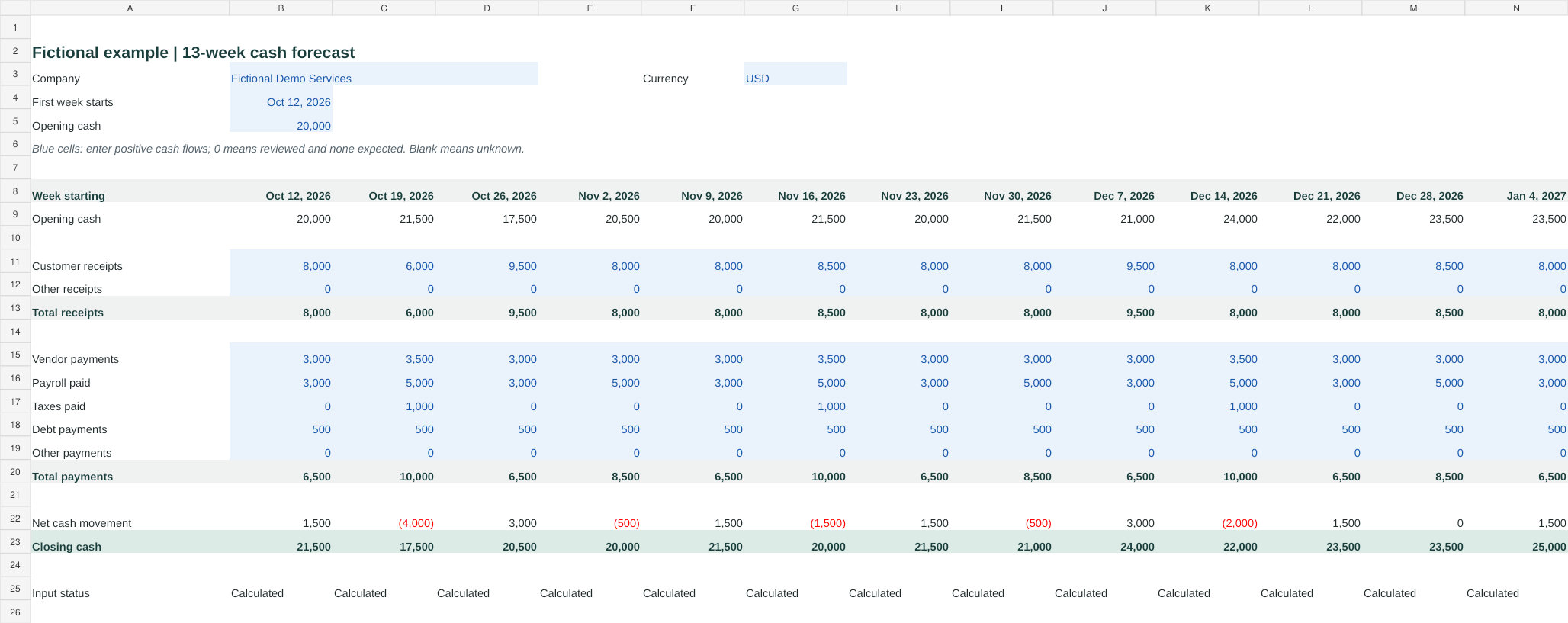
The preview shows the included Example sheet. Use the separate blank Forecast sheet for your own figures.
Inspect the lowest weekly closing balance as well as the final week. A positive balance after thirteen weeks can hide a shortfall earlier. A weekly model can also hide a shortage between a Monday payment and a Friday receipt, so examine daily timing when the margin is tight.
Check a delayed receipt scenario
Save a copy of the completed forecast and move a material expected receipt to a later week. Do not merely reduce receipts forever if the scenario is a delay rather than a loss. State the changed assumption and compare the lowest balance and its week with the base forecast.
For example, moving the Example sheet's week-one $8,000 receipt to week three reduces week-one cash to $13,500, with the later receipt restoring the timing difference. The point is to expose when cash is needed, not to manufacture a reassuring ending balance.
Use AI to prepare the inputs
Confirm the QuickBooks company. Retrieve the balance sheet and receivables and payables aging as of the forecast start, then list the balances and records relevant to opening cash, customer collections and vendor payments. Keep source facts separate from timing assumptions. Ask for payroll, tax, debt and other commitments that are missing. Do not record transactions or treat invoice due dates as confirmed collection dates.
Verify the returned reports in QuickBooks before transferring figures into the workbook. The P&L analysis guide explains how to check report scope, while the month-end checklist helps establish the quality of the underlying records.
DeepLedger can help retrieve supported reports and explain source figures. This workbook supplies the forecast model; it is not a claim that DeepLedger has an autonomous forecasting feature. QuickBooks also offers its own Cash Flow Planner in supported accounts. Check availability and assumptions before relying on that separate product feature.
Update the forecast each week
Save the previous version, compare actual receipts and payments with the forecast, and explain material differences. Update expected collection dates and commitments rather than carrying old guesses forward. Roll the forecast forward so it continues to cover thirteen weeks.
Keep the historical Statement of Cash Flows separate: it explains past activity, while this model estimates future cash timing. Neither a profitable month nor a positive year-end projection establishes that every bill can be paid on its due date.
Frequently asked questions
Is a Statement of Cash Flows a forecast?
No. It describes historical cash movements. A forecast estimates future receipts and payments using source records and explicit timing assumptions.
Does the template connect directly to QuickBooks?
No. It is an editable workbook. Enter verified balances and weekly assumptions from QuickBooks and other supporting records; its formulas calculate projected cash.
Can DeepLedger predict when customers will pay?
It can help retrieve available records and prepare analysis, but an invoice due date is not a guarantee of collection. Confirm timing assumptions and review them as actual receipts arrive.